The WordPress Maintenance Trap
A freelancer launches a WordPress site for a client. Within three months, there are four plugin updates pending, a PHP compatibility warning, and a security patch that breaks the contact form. The client calls, frustrated. The freelancer spends two hours fixing what should have been a routine update. This scenario plays out thousands of times daily across the WordPress ecosystem, and it points to a structural problem that no amount of plugins can solve.
WordPress powers a significant share of the web, and for good reason: it was revolutionary when it launched over two decades ago. But the architecture that made it flexible in 2005 now creates friction in 2026. The plugin dependency model, the manual maintenance cycle, and the absence of native AI capabilities have turned what was once a strength into a liability for businesses that need speed, SEO performance, and multilingual reach without a dedicated technical team.
SpeakSite represents a fundamentally different approach: an AI website builder that generates clean, semantic PHP and Tailwind CSS code through natural language instructions. No plugins to manage. No security patches to chase. No separate tools for SEO, translations, or blog content. Everything is integrated from the start.
Architecture: Plugin Stack vs. Integrated Platform
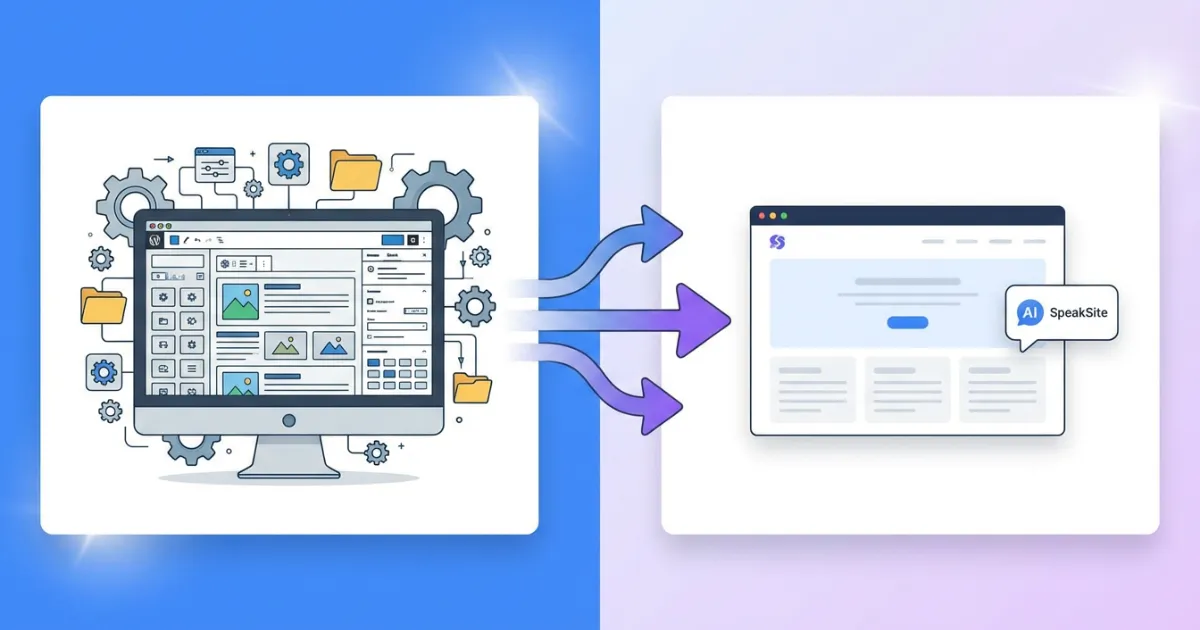
WordPress relies on a modular architecture. Need SEO? Install Yoast or Rank Math. Need multilingual support? Add WPML or Polylang. Need a page builder? Choose between Elementor, Divi, or Gutenberg blocks. Need caching? Pick from W3 Total Cache, WP Super Cache, or LiteSpeed Cache. Each plugin adds database queries, potential conflicts, and maintenance overhead.
A typical business WordPress site runs between 15 and 30 active plugins. Each one introduces its own update cycle, its own compatibility requirements, and its own potential attack surface. When Plugin A updates and breaks compatibility with Plugin B, the site owner becomes the unwilling referee.
SpeakSite eliminates this layer entirely. The platform generates complete websites with built in SEO optimization, multilingual support for six languages, blog functionality, Google Tag Manager integration, and Google Ads management. These are not bolted on modules. They are native capabilities of the platform, maintained and updated as a single coherent system.
The practical difference is measurable. A WordPress site with Yoast SEO, WPML, Elementor, a caching plugin, and a security plugin requires the site owner to monitor five separate update channels and test compatibility after each change. With SpeakSite, the platform handles all of these functions without any plugin management at all.
SEO: Retrofitted vs. Native
This is where the WordPress vs SpeakSite comparison becomes most consequential for businesses that depend on organic traffic. WordPress does not generate SEO optimized markup by default. Its output depends entirely on the theme, the page builder, and the SEO plugin you choose. Many popular WordPress themes produce bloated HTML with excessive div nesting, inline styles, and poor heading hierarchy.
SpeakSite generates HTML5 semantic markup on every page: proper header, nav, main, article, section, and footer elements. Schema.org JSON-LD is injected automatically. Meta titles and descriptions are optimized per page with a built in editor that shows character counts and Google preview. Open Graph and Twitter Card tags are standard. The sitemap XML is auto generated for both pages and blog posts. Hreflang tags are automatically added when multiple language versions exist.
Consider a specific scenario: a consulting firm wants a bilingual website (English and Spanish) with proper SEO. With WordPress, they need a theme that produces clean markup, Yoast or Rank Math for meta tags and schema, WPML or Polylang for translations (with a separate license fee), and manual configuration of hreflang tags. If the theme changes or a plugin updates incorrectly, any of these elements can break silently.
With SpeakSite, the same firm describes their business through the creation wizard, selects their industry (consulting), chooses a corporate style, and gets a complete website with semantic HTML, schema markup, meta tags, and a language selector. Adding Spanish takes one click. The AI translates content contextually, not word for word, and generates proper hreflang references between language versions automatically.
Core Web Vitals and Page Speed
WordPress sites frequently struggle with Core Web Vitals, particularly Largest Contentful Paint (LCP) and Cumulative Layout Shift (CLS). The culprits are predictable: heavy page builders that load hundreds of kilobytes of CSS and JavaScript, render blocking resources from multiple plugins, and unoptimized images served without proper sizing attributes.
SpeakSite generates lightweight PHP pages with Tailwind CSS. There is no JavaScript framework overhead, no virtual DOM, no client side rendering delay. The output is server rendered HTML that browsers can parse immediately. Image optimization happens automatically during the publishing process. The result is consistently strong Lighthouse scores without the need for caching plugins or CDN configuration.
Content Creation: Manual Labor vs. AI Assistance
WordPress has the Gutenberg block editor, which is serviceable for writing blog posts but offers no AI assistance for content generation, SEO optimization, or translation. Third party AI writing tools exist (Jasper, Copy.ai, SurferSEO), but they require separate subscriptions, separate workflows, and manual copy paste between tools.
SpeakSite integrates AI content creation directly into the platform. The AI powered blog system generates complete posts with proper SEO metadata, categories, tags, and featured images. Each post gets its own meta title, description, and keywords. Posts can be scheduled, drafted, or published immediately. When multilingual support is active, blog posts are translated automatically with the same contextual AI that handles page translations.
The editor itself accepts instructions through three input modes: text chat, voice commands, and drawing annotations directly on the page preview. A business owner can literally say "add a testimonials section below the services area" and watch the AI generate the markup in real time. This is not a template swap; it is code generation based on natural language understanding of the existing page structure.
The Blog Workflow Comparison
Publishing a blog post on WordPress involves: writing the content (or pasting from an AI tool), formatting with blocks, adding a featured image, writing the meta description in the SEO plugin, selecting categories and tags, checking the SEO score, and hitting publish. For a bilingual site, duplicate the post, translate it manually or with WPML's translation editor, and verify that the translated version has its own SEO metadata.
In SpeakSite, the blog tool handles post creation with AI assistance, applies SEO metadata automatically, and translates the post to configured languages. The workflow condenses from a multi tool, multi step process into a single panel interaction.
Multilingual Websites: Plugin Complexity vs. Native Support
Building a multilingual website on WordPress is one of the most common sources of frustration for site owners. WPML, the market leader, costs $99 per year for the Multilingual CMS package. Polylang Pro costs $99 per year. Both require careful configuration of URL structures (subdirectories, subdomains, or domain mapping), translation management, and language switcher placement.
When something goes wrong with a multilingual WordPress setup, the debugging process is painful. Hreflang tags may point to wrong URLs. The language switcher may disappear after a theme update. String translations for plugin generated text may revert. These are not edge cases; they are routine occurrences that WordPress multilingual users encounter regularly.
SpeakSite handles translations natively with AI that adapts tone, cultural context, and expressions rather than performing literal translation. The platform supports six languages (Spanish, English, Portuguese, French, German, Italian) with URL strategies configurable as path based prefixes (/en/, /es/) or subdomains. Hreflang tags are generated automatically. A visual language selector widget is created by the AI and integrated into the site design.
The translation system also works with the chat editor. When the "Apply to all languages" option is enabled, changes made to one language version are automatically translated and applied to all other versions. This means a single instruction like "change the hero headline to emphasize speed" updates the page across every configured language.
Cost of Ownership: Hidden Expenses vs. Transparent Pricing
WordPress itself is free, but a professional WordPress site is not. Here is what a typical small business WordPress setup costs annually:
- Hosting: $120 to $360 per year (quality managed hosting)
- Premium theme: $60 to $200 (one time, but major updates may require repurchase)
- SEO plugin (premium): $99 to $199 per year
- Multilingual plugin: $99 per year
- Page builder (premium): $49 to $99 per year
- Security plugin: $80 to $200 per year
- Backup plugin: $50 to $100 per year
- Form plugin: $49 to $199 per year
The total ranges from $600 to $1,350 per year, before counting the time spent on updates, compatibility testing, and troubleshooting. Factor in a developer's time for quarterly maintenance at $75 to $150 per hour, and the real cost climbs significantly higher.
SpeakSite's Pro plan at $29 per month ($279 annually) includes SEO tools, code export, GitHub integration, FTP deployment, one extra language, a basic blog with five posts, and 200 AI queries per month. The Business plan at $79 per month ($790 annually) adds unlimited blog posts, six languages, custom domain with SSL, analytics integration, and Google Ads management. Both plans include everything; there is no plugin marketplace to navigate.
The Developer Freedom Factor
One common argument for WordPress is ownership: you can take your site anywhere. This is true, but moving a WordPress site between hosts involves database migration, search and replace operations for URLs, plugin license transfers, and DNS configuration. It is technically possible but rarely simple.
SpeakSite also allows code export. The generated PHP and Tailwind CSS code is yours. You can deploy it to any hosting provider via FTP or push it to a GitHub repository directly from the editor. There is no vendor lock in because the output is standard, readable code rather than a proprietary format that only works within the platform.
Who Should Stay with WordPress
Intellectual honesty matters in any comparison. WordPress remains the stronger choice in specific scenarios. Sites that require complex e commerce with WooCommerce, extensive membership systems, or highly customized applications built on the WordPress REST API are better served by the WordPress ecosystem. If your business has a dedicated development team comfortable with the WordPress stack, the plugin model provides flexibility that a managed platform does not.
Large media organizations running thousands of articles with complex editorial workflows, custom taxonomies, and third party integrations also benefit from WordPress's maturity in content management at scale.
Who Should Consider the Switch
The WordPress vs SpeakSite decision tips toward SpeakSite for a specific profile of users. Freelancers who build client websites and want to reduce production time from weeks to hours. Small business owners who need a professional web presence with strong SEO but lack technical skills. Agencies looking to scale their web production capacity without hiring additional developers. Businesses targeting multiple language markets that want proper multilingual SEO without the complexity of WPML.
The calculation is straightforward: if you spend more time maintaining your WordPress site than improving your business, the maintenance model is working against you. If your plugins cost more than a unified platform subscription, you are paying a complexity tax. If your site's Lighthouse scores suffer because of plugin bloat, your search rankings pay the price.
SpeakSite starts at €12/month with 50 AI queries and no long-term commitment. Build a page, check the HTML output, run a Lighthouse audit. The code quality speaks for itself. Start building your site with AI today and compare the results against your current WordPress setup. The migration might be simpler than your last plugin update.