Before: the record on one side, the page on the other
Until now you built a form in the left-hand panel and then asked the AI to place it on a page. It worked, but blind: you didn't see the result until it finished, every attempt spent queries, and there was no way to take a form off a page without asking again.
Now: a "Forms" mode on the floating bar
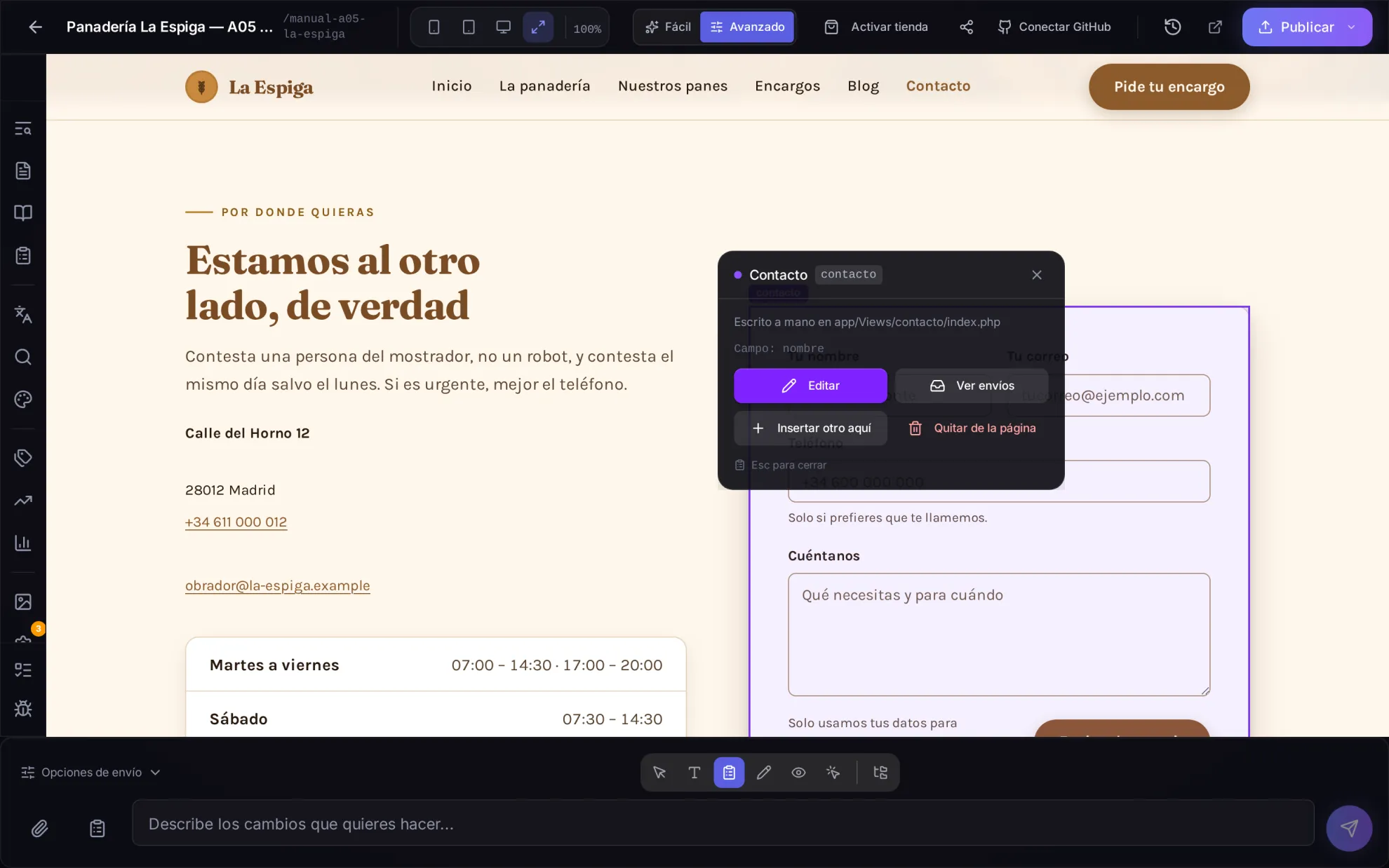
The bar under your site's preview has a new icon with a clipboard. With it on, every form on the page is outlined as you hover, and clicking one opens a small panel next to it with four things: Edit, View submissions, Insert another here and Remove from page.
Every change shows up instantly
Click Edit and the form's record opens with a "Live on the page" badge: change a label, add a question or tweak the look, and the form on the page is redrawn as you type. Save writes the record and the page at once; going back without saving leaves the page as it was.
Insert wherever you say, no AI needed
Click a heading, a paragraph or a section and choose which form goes before, after or inside it. The platform writes it itself, in a careful design (card, rounded fields, options as chips and a button in your site's accent colour) that you can adjust from the new Appearance tab. If you'd rather let the AI pick the spot, that's still there.
Templates and multi-step forms
When creating a form you can start from eleven ready-made templates — contact, quote request, appointment booking, multi-step enrolment, survey, job application with CV, support, RSVP and more — in your site's language. Multi-step forms got friendlier: the Enter key moves to the next step instead of submitting, and the texts ("Next", "Back", "Sending…") appear in your site's language.
And three things that no longer fail
Multiple checkboxes and multi-select lists now arrive complete; a question shown only depending on another answer behaves the same on the site as in the preview; and when you delete a form the panel tells you which pages it's on and offers to remove it from them, so your site doesn't keep a form that can no longer send anything.