Before: always typing, always explaining where
Until now, asking the AI for a change meant typing it into the chat box and describing in words where the thing you wanted to touch was. The microphone existed, but hidden inside Draw mode, and asking about your site without wanting to change anything sent you to a separate tool.
Now: press the microphone and talk
The microphone sits in the chat bar, in every mode. Press it, say "change the button text to Sign in" and watch your words appear as you speak. When you pause, the request sends itself; if you want to fix something first, tap the countdown ring and edit the text at your own pace. When a request comes in by voice, Sofi confirms out loud that the change is done.
Ask by pointing
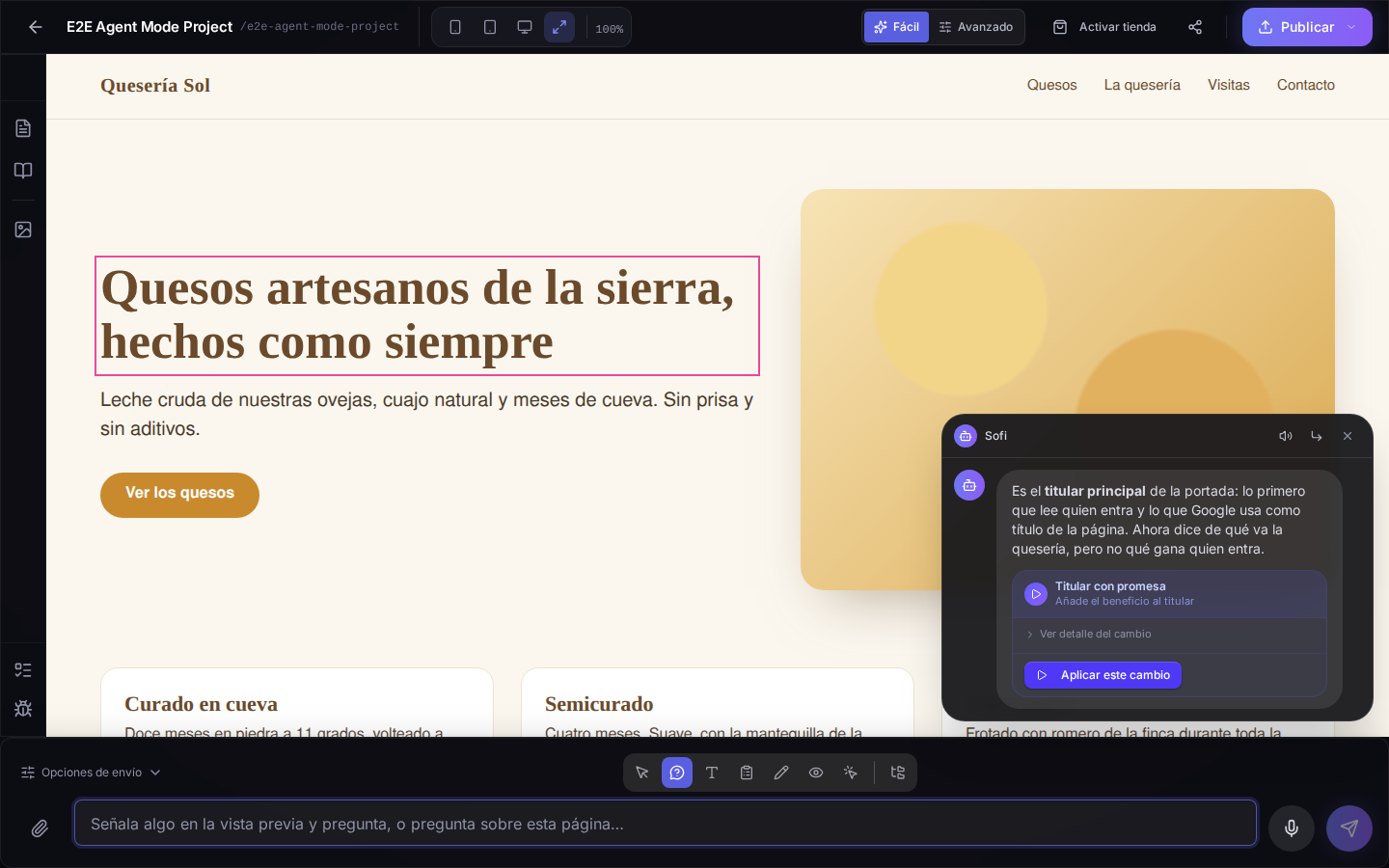
There is a new mode in the mode bar: Ask. Move over your site, tap an element and ask whatever you want about it: "why doesn't this show on mobile?", "what does this button do?". Sofi answers in a bubble next to the chat, with what she looked at, and if she suggests a fix you apply it with one button. Each question counts as one query, just like a change request.
Sofi answers with her voice
If you talk to her, she talks back, in your language. In Voice settings, next to the microphone, you choose whether Sofi reads always, only when you talk to her, or never, and whether what you dictate sends itself or waits for Send. It works in any modern browser: if yours cannot recognise speech, the microphone tells you so instead of disappearing.