The hard part of SEO is not fixing it: it is knowing what is wrong
Almost nobody wrestles with SEO for fun. They wrestle with it because someone told them their site does not show up, and between what a tool says, what a friend says and what a plugin says, there is no way to know what actually needs changing. Least of all when the thing that needs changing is a tag you did not know existed.
In Speaksite that work sits in the same panel where you write the page, and it has two halves: what your page is missing, and what Google says about it.
First: what this page is missing
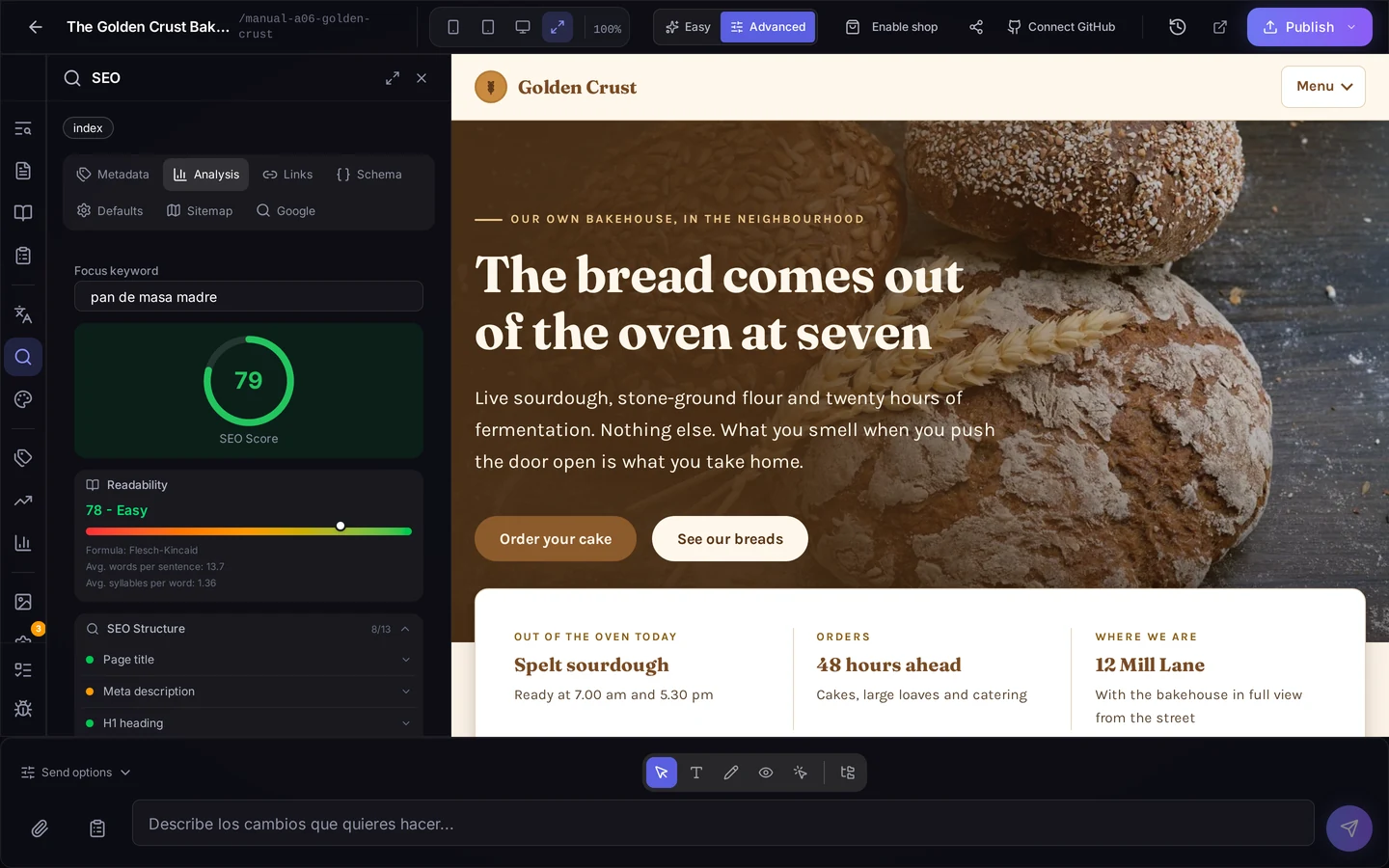
Open the SEO panel on a page and you get, right beside the page you are editing:
- The focus keyword you want that page to show up for.
- An SEO score for that specific page, not for the whole site.
- A readability reading of the text, with average words per sentence and syllables per word. It is an uncomfortable, useful number: it usually explains why a text reads badly.
- The structure checklist, with a traffic light per item: page title, meta description, main heading and the rest. How many you have out of how many, and which one is red.
That alone solves half the problem: it stops being "my site does not show up on Google" and becomes a short list of concrete things.
Title and description, written by the AI
The two items most often left half done are the title and the meta description — the words people actually see in the search result. One button has the AI write them from the real content of the page, and another generates them for every language you have active at once. They stay editable, with the character counter in view so you do not run long.
Then: what Google sees wrong, in Google's words
That same panel has a Google tab. There you connect your own Search Console account — yours, with your verified property — and press Check to ask Google page by page.
What comes back is not our interpretation: it is Google's literal complaint about each URL, untranslated, grouped by type of problem and with the number of URLs affected. If Google sees nothing wrong in what was checked, it says that too.
And the button that fixes it
Depending on the problem, you have three ways to resolve it without leaving the screen:
- Fix what is safe: everything that can be corrected without a content decision gets applied in one go.
- Write with AI: where the answer is text, the AI proposes and you decide whether to apply it. You see the suggestion before applying it.
- Fix with AI: where the problem lives in the code of your pages, a request that edits your project's files.
That last one is one request per group of pages, not one per URL: if twenty pages fail for the same reason, the cause is fixed once and all twenty are fixed with it.
Knowing where it stands
A fix is not instant and the screen does not pretend otherwise. You watch the state in plain words: queued, working, or stopped because the request has a question for you. When it finishes it keeps telling you what is left: fixed in the draft, publish the site so Google can see it; and once published, that you can notify Google now.
Notifying resubmits your sitemap and rechecks those URLs. From there on Google is in charge: the screen tells you when it was notified, whether Google has crawled again, and what it saw. If it came back and still sees the problem, it says so. Nobody promises you a deadline that is not ours to promise.
When there is no button
Some issues come without a fix button, and that is deliberate. If the page is already fixed and all that is missing is Google coming back to look, launching another fix would change nothing. And if the cause is not in your site's files, a request against your project would not touch it either. In both cases the screen explains why there is no button, instead of leaving you pressing one that was never going to help.
Where to start
- Open a page in the editor and go to the SEO panel.
- Set the keyword, look at the score and fix whatever is red. Let the AI write the title and description.
- Go to the Google tab and connect your Search Console.
- Press Check and read what Google says about your URLs.
- Fix, publish, notify Google. Then come back in a few days to see whether it crawled again.
It is not magic and it does not promise you the top spot. It is the end of guessing: knowing what is wrong, with Google's own sentence in front of you, and having the fix one click away.