The problem: a form nobody was watching
Until now, if you hadn't typed an alert address into a form, submissions were still saved but nobody's inbox ever heard about it. You wouldn't notice until someone asked "did my booking/order actually go through?".
Now there's one place to say where alerts go
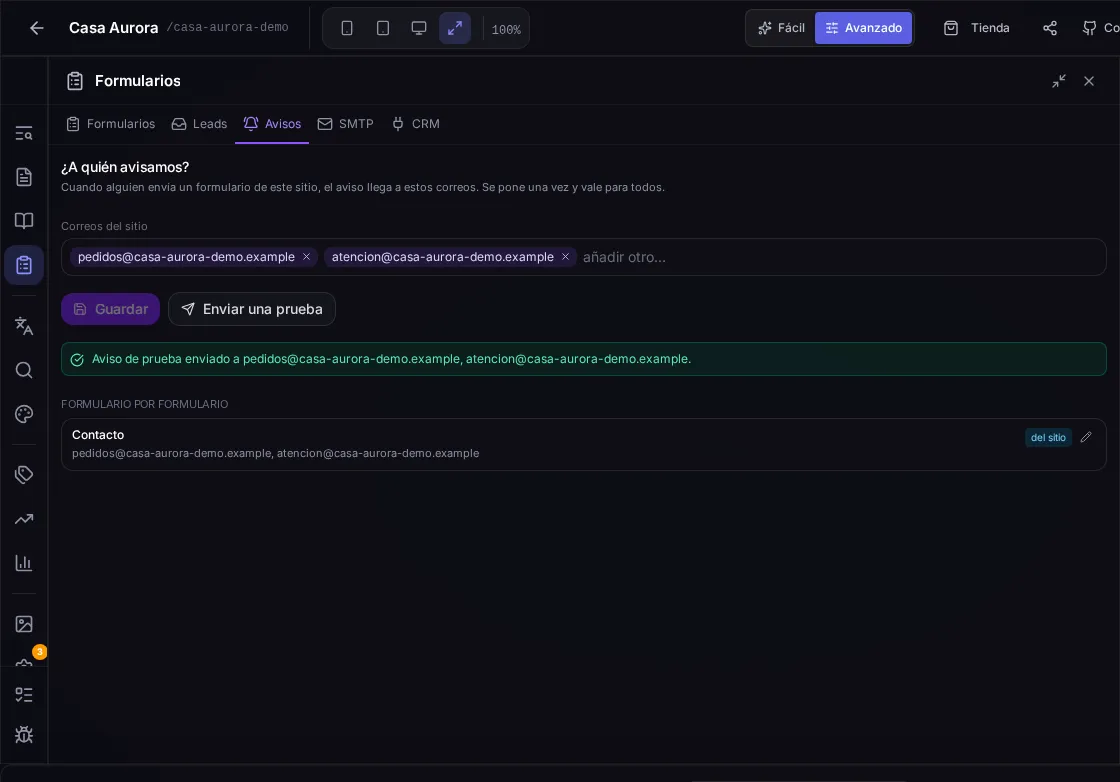
Forms has a new Alerts tab: add the addresses you want notified and they apply to every form on the site. Add them one at a time - each becomes a removable tag - and an invalid address is rejected on the spot instead of failing silently later.
If one form needs to go somewhere else - a booking to one inbox, a general enquiry to another - it can keep its own addresses without touching the site-wide list.
Check it before a customer does
Send a test fires an alert with the same template, sender and inbox as a real one, and it never shows up mixed in with actual submissions. You get proof it works without filling in your own public form or cluttering your inbox.
And if you set nothing at all
A form with no addresses - neither its own nor the site's - no longer goes silent: the alert now falls back to your account email. If you genuinely want a form to notify nobody, you now have to say so on purpose, with its own checkbox.