Before: dictate, wait, read
Talking to your website meant pressing the microphone, dictating one sentence, waiting for it to send and reading the result. It worked, but every request was a separate turn: no conversation, and in between you didn't know whether Sofi had heard you or how long she had left.
Now: a call
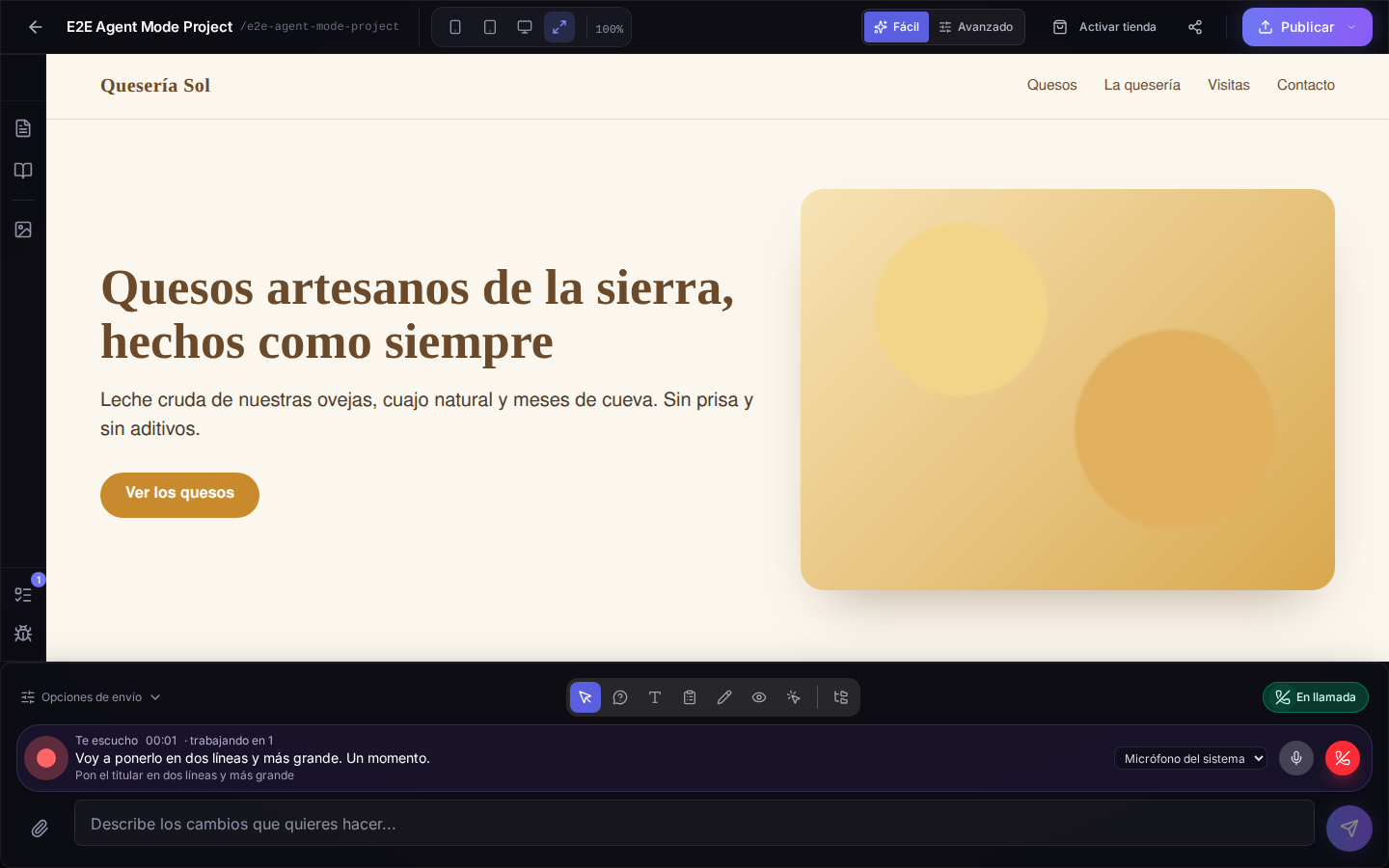
When Sofi's voice is enabled on your account, the microphone in the chat bar is a phone. Press it and Sofi picks up: she greets you, listens the whole time and answers out loud right away. You can interrupt her, ask for several things in a row or simply ask what she thinks of your home page, just as you would ask someone sitting in front of your website.
She gets things done while you talk
Ask for a change ("make the booking button green", "change this" while pointing at an element in the preview) and she tells you she's on it; when the change is applied, she confirms it. Ask about your site ("why doesn't this show on mobile?") and, if she needs to look at the code, she says she's checking and tells you as soon as she knows. Every change or question counts as one request, the same as typing it.
Everything in view
The bar shows whether Sofi is speaking or listening, the last thing each of you said, how long the call has lasted and what she is still working on. One button mutes your microphone and the red one hangs up; if you say goodbye, Sofi hangs up herself. And if at some point she can't hear you, she tells you which microphone she's listening through and lets you switch it right there.