Selling online is the easy part. The hard part starts straight afterwards: one order arrives by email, another by phone, there is a note somewhere about who has already paid, a customer rings to return something and nobody knows whether it came back, and at the end of the month there is the awkward question of how much was actually refunded.
That part is solved in Speaksite too, and it is the part nobody talks about. An order in your shop is not an email. It is a record, with a status, a history and a set of things you can do to it.
An order, from beginning to end
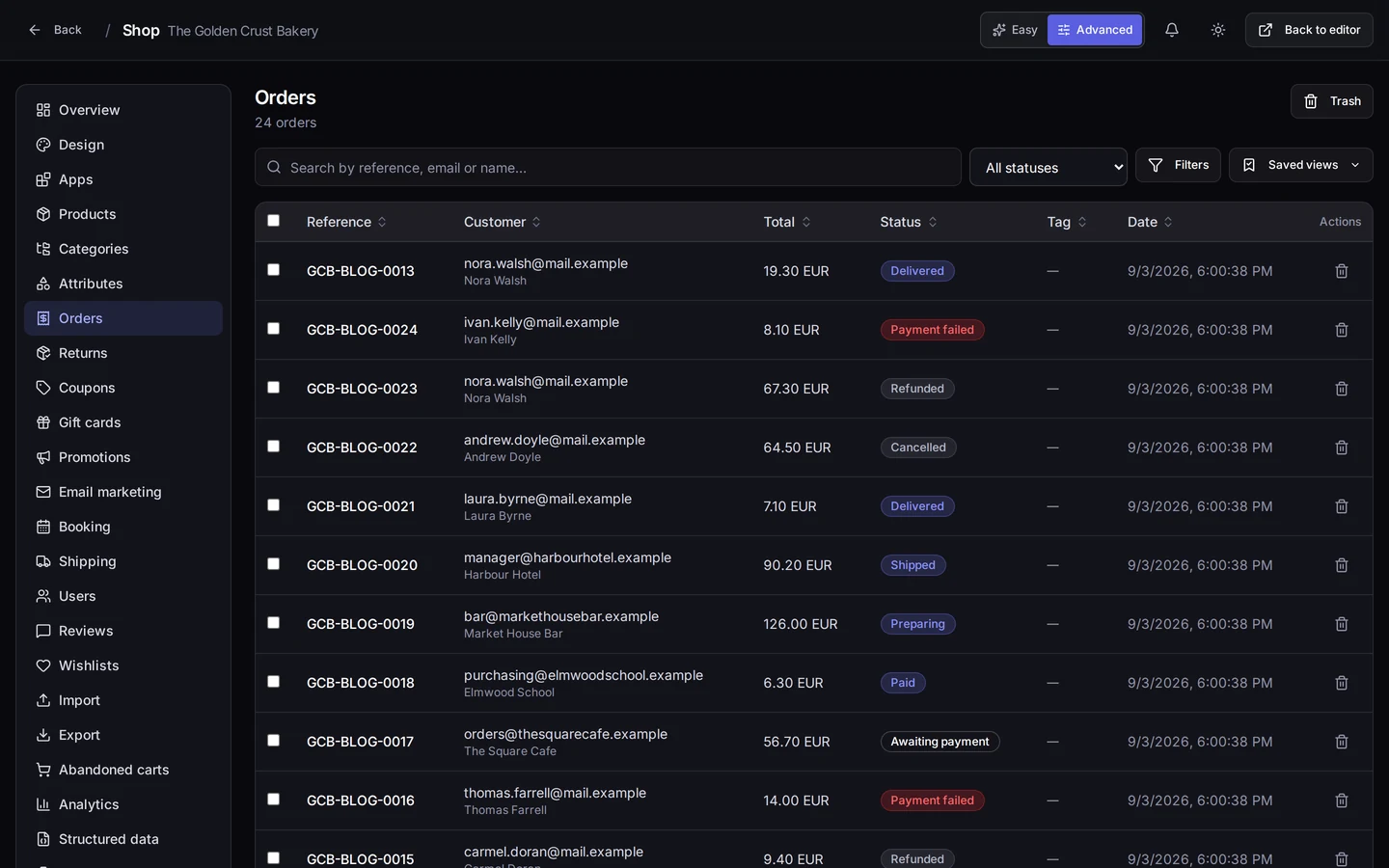
The screen at the top of this page is the order list of our demo bakery: every row with its reference, its customer, its total, its status and its date. It is the screen you open in the morning. From there, and from each order's own page, you can:
- Move the status along as things happen: paid, being prepared, shipped, delivered. Your customer sees the same status you do.
- Set up the shipment. An order can have one shipment or several, each with its own contents, and you mark them as shipped when they leave. If half goes out today and half on Thursday, there is a way to say so.
- Give money back. Full or partial refunds, each one recorded against the order rather than in your memory.
- Cancel an order that is not going any further.
- Confirm or release a held payment. When the final amount depends on weight or on how the order is put together, the payment can be authorised first and then confirmed for the real amount — or voided without charging anything.
Two more things that sound minor until you are doing a hundred orders a month: bulk actions, so you move twenty orders to the next status at once instead of one by one, and saved views, so the search you run every single day — today's, the ones waiting to ship — is already there when you walk in. Plus a safety net: deleted orders go to a bin you can pull them back out of.
Returns, run as a process instead of on goodwill
A return gets its own screen and its own four steps, in the order they actually happen: you approve or reject it, you mark the goods as received, and only then do you refund.
It can look like paperwork. It is the opposite: it is what stops the two arguments you always end up having. The one about "I definitely sent it back" with nothing to show for it, and the one where you refunded before the parcel ever arrived. Every step is stamped with its date, so whoever picks up the phone next week can see where the return stands without calling you.
Your customers, with a record each
The menu calls it Users, and it is the list of everyone who has bought from you. Each one has a record: contact and tax details, an address book, and their orders. You can add someone by hand — the regular who would rather ring you — correct their details, check that their VAT number is valid before you invoice, and export the list when you need it elsewhere.
There is also one feature that heads off a lot of confusion: viewing the shop as that customer sees it. It is a read-only preview that touches nothing on their account, and it answers the single hardest question to settle over the phone in about ten seconds — what price are they actually looking at.
If you sell to businesses, not everyone pays the same
Once you are selling to other businesses, the list price is a polite fiction: every account has its own. That is what groups and price rules are for. You put your trade customers into groups — wholesale, hospitality, partners — and give each group its terms. The customer logs into your shop and sees their price, not the shop-window one.
And because you do not want just anyone signing up as a wholesaler, trade registrations can be held pending your approval: you approve or reject them yourself, one at a time, from the customer's record.
Who changed what, and when
If more than one person works in your shop, sooner or later a price is not what it was and nobody changed it. The Audit log keeps what happens in the shop: the date, the person, and the thing that was acted on. You can read it on screen and download it as CSV.
With one caveat we would rather tell you before you find it yourself: the action column shows the engine's technical name, along the lines of product.deleted, not a plain English sentence. It reads fine and it settles the argument, but it is not prose. We would rather say so than sell you something you will not find there.
Where it is in your panel
It all hangs off your project's Shop: /shop/<your-project>/orders for orders, and in the same left-hand menu, Returns, Users, Groups and Audit log.
Remember the switch at the top right: in Easy the menu stays down to the essentials, so you will see Orders but not Returns or Audit log. Flip it to Advanced and they appear. Trade groups also need the B2B app switched on from the Apps screen.
What you get out of it
You stop running the shop in three places at once. An order's status stops being something only you know, a return stops depending on somebody remembering, and the end-of-month questions — how much sold, how much came back, who actually buys — have answers you look up instead of estimate.
And there is a less obvious benefit: you can go on holiday. When the process is on the screen instead of in your head, somebody else can handle an order without ringing you.
Where to start today
Go into your project's Shop, flip the switch to Advanced and open Orders. Take the last real order you have, open it, and read its page all the way to the bottom: you will see where the status changes, where the shipment is prepared and where the money goes back. One order and you know the screen. Then open Users and look at that customer's record.