Someone came in, had a look, put three things in the basket and left. Nothing dramatic happened: the phone rang, or they wanted to finish it later on the laptop at home. In a shop on the high street that customer is gone. In an online shop, you can go and find them.
This is the part of Speaksite fewest people know about, and the part that leaves the most money on the table when nobody uses it. Seven separate things, and not one of them asks you to cut your price.
1. The carts that never made it
Your shop keeps the baskets nobody paid for. Not as a statistic — as a list, with a name attached, what was in it and what it was worth. From there you can send that person a reminder that takes them back to their basket, exactly as they left it, or discard it if it clearly is not going anywhere.
And you do not have to be sitting there for it. The reminders have their own settings, with several stages: one after a short while, another the next day. You decide how many and when. The screen also carries its own recovery figures, so it is not a matter of faith: you can see how much of what was abandoned actually came back.
2. Subscriptions: the customer who returns without being asked
If what you sell gets used up and replaced — coffee, bread, pet food, a monthly service — the one-off sale is the most expensive one you will ever make. With subscriptions, the customer signs up once and the billing repeats on its own.
In your panel you have all of them listed, each with its own page. You can cancel one (at the end of the period they already paid for, or immediately if it has to be) and retry a payment that failed — which is what actually happens day to day. An expired card should not cost you a customer.
3. Promotions with a start and an end date
A promotion is scheduled. You set it up today with its dates, and it comes in and goes out by itself. Nobody has to remember to switch it on at nine on Friday night or — and this is the one that really gets forgotten — to switch it off on Monday morning.
4. Banners that say what is true right now
The strips that run across your shop — free delivery this week, the August opening hours, whatever is in season — are created and removed from the panel. Without touching the design and without asking anyone for anything.
5. Gift cards, under control
Your customers can buy gift cards, and you can see all of them: which exist, what state they are in and how much balance is left. If one was bought by mistake or needs pulling, you can void it from its page. It is worth being precise here, because this often gets told backwards: the customer buys the card in your shop; what you have in the panel is control over the ones in circulation.
6. Affiliates: other people selling for you
You register whoever sends you customers — a blog, an association, the neighbour who keeps recommending you — and from then on you can see each one's conversions, meaning the sales they genuinely brought in, and record their payout. That is the difference between a handshake and an arrangement with numbers attached.
7. Email campaigns, without buying another tool
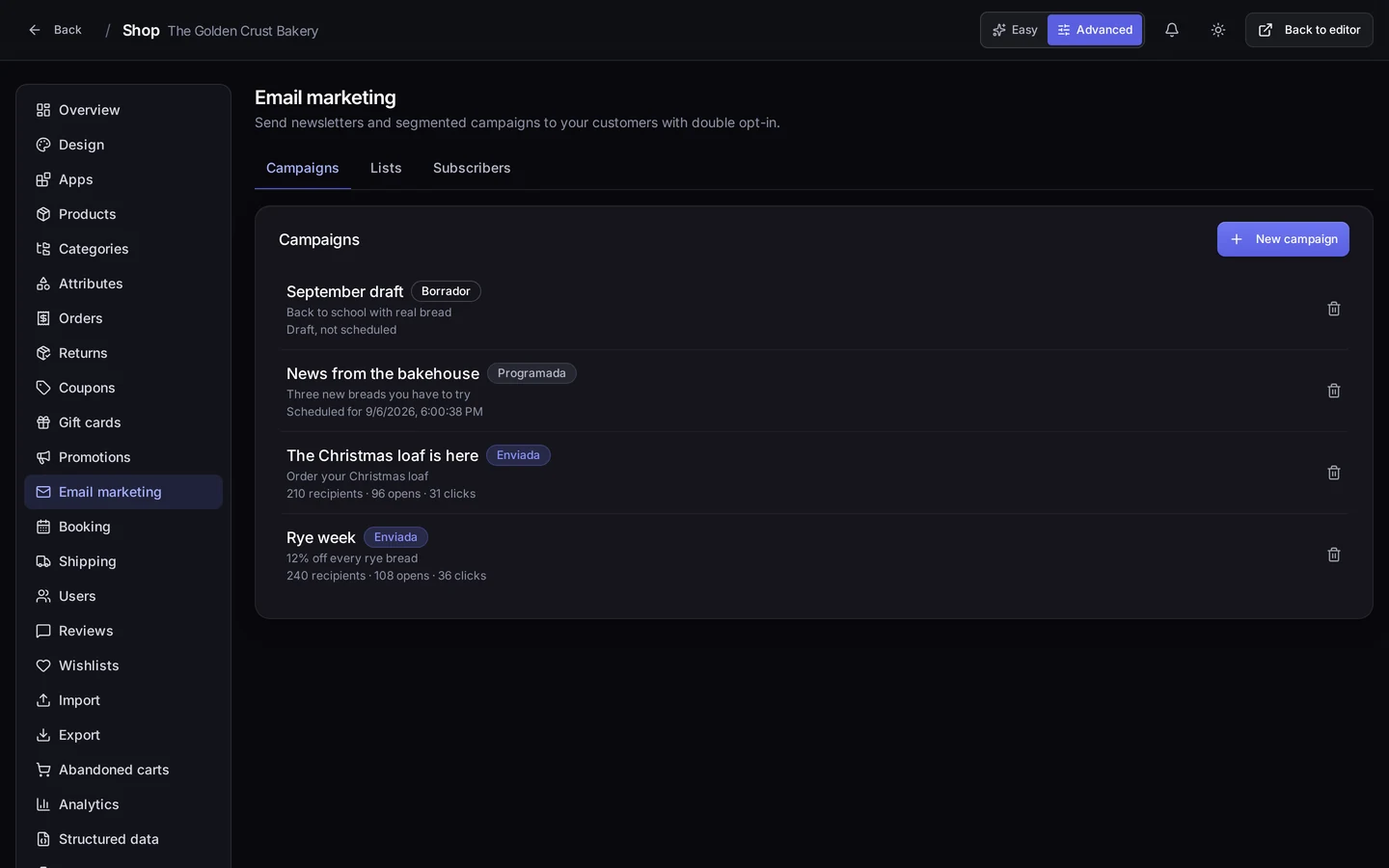
The screen at the top of this page is exactly this: the Email marketing of our demo bakery, with its campaigns and the status of each — draft, scheduled, sent. Inside there is what you need to work properly:
- Lists and subscribers. Your mailing lists and who is on each one. They export.
- Campaigns. You write them, keep them as drafts, and send now or schedule for later.
- A test send to your own address before anything goes out. Anyone who has ever mailed a typo to two thousand people knows what that button is worth.
- Segmentation with a preview. Before sending, you can see how many people the filter you built will actually reach. You pick your audience by looking at it, not by guessing.
Where it is in your panel
It all hangs off your project's Shop. Promotions and Banners at /shop/<your-project>/promotions; and in the same menu, Email marketing, Subscriptions, Gift cards, Affiliates and Abandoned carts.
If one of those entries is missing there are two explanations, and both take a minute to fix: the switch at the top right is on Easy instead of Advanced, or the matching app is off on the Apps screen. Gift cards, Subscriptions, Affiliates, Email marketing and Abandoned carts are all apps you turn on and off whenever you like.
What you get out of it
None of these seven asks you to drop your price, and that is the point. The sale you rescue from an abandoned cart is a sale you nearly had already. A subscription turns a customer into a returning one. An affiliate brings you people who had never heard of you. And an email campaign talks to somebody who has already bought from you, which is always the cheapest person to sell to.
The more immediate gain: you stop paying for three separate tools — one for email, one for subscriptions, one for carts — that do not talk to each other anyway. Here they are all looking at the same orders and the same customers.
Where to start today
Start with what is already happening without you seeing it. Go into Shop, flip the switch to Advanced and open Abandoned carts. Look at the list: those were sales that got within one click. Take a single one, send the recovery reminder and watch what happens. If it works once, go into the settings and leave the reminders running on their own.