One question kills more sales than the price of the product: what does it cost to get it to me. If a customer cannot answer that from the screen in front of them, they leave. And if the answer only shows up at the last step, they leave in a worse mood.
This piece is deliberately short, because so is the thing it describes. Your shop's delivery is set up on a single screen — Shipping, in the Shop menu — and nobody needs to touch it for you.
Shipping methods, one by one
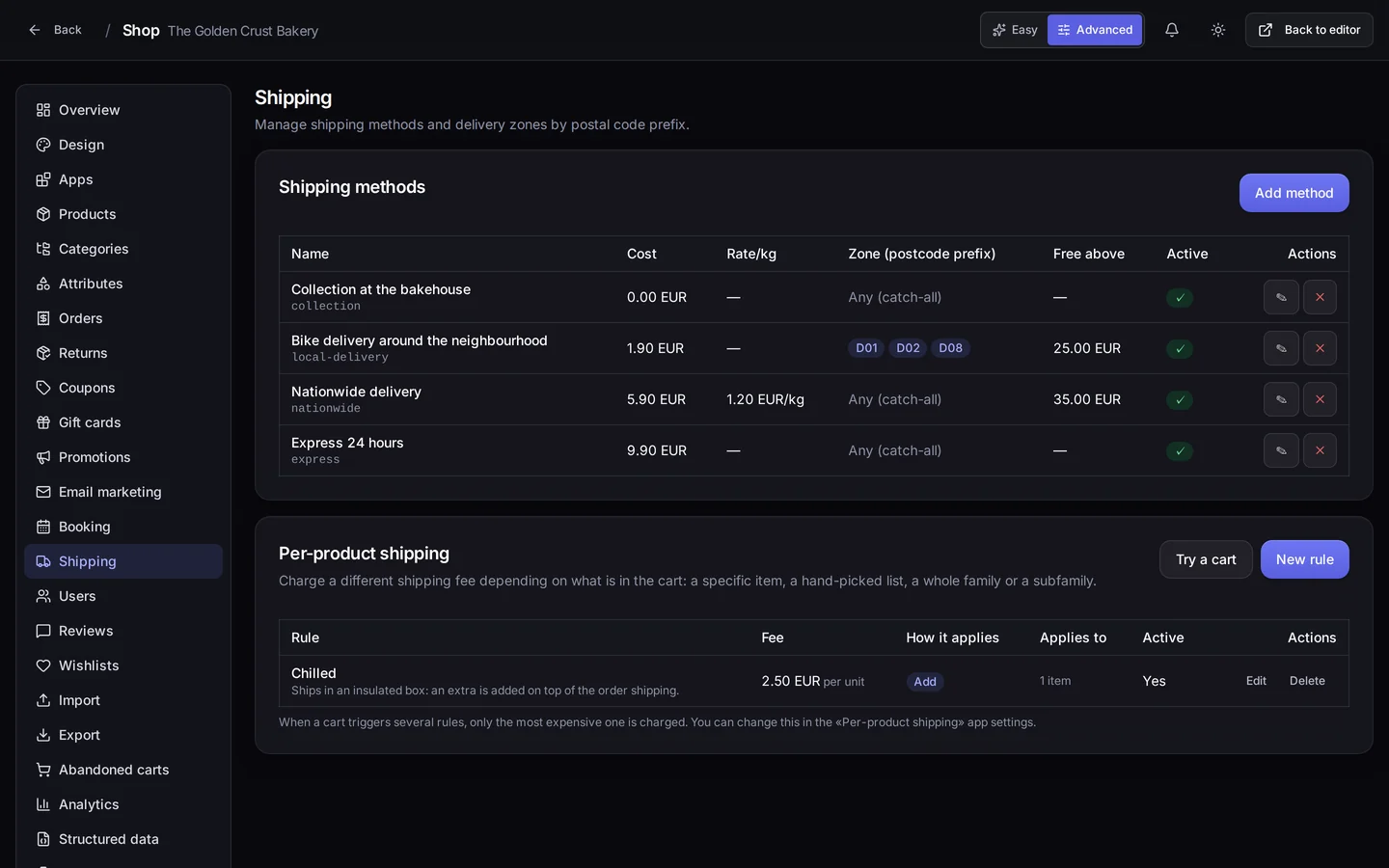
The screen at the top of this page belongs to our demo bakery: the four methods it has set up on top, and per-product shipping underneath. It is a good example because they are four genuinely different ways of handing goods over, not the same one four times:
- Collection at the bakehouse, at no cost. The customer comes and gets it.
- Bike delivery around the neighbourhood, 1.90 EUR, free over 25 EUR.
- Nationwide delivery, 5.90 EUR plus 1.20 EUR per kilo, free over 35 EUR.
- Express 24 hours, 9.90 EUR, with no free threshold: if it is urgent, it is paid for.
Every method is one row of the table, and every column is a decision of yours. The cost and the per-kilo rate, so you can charge by weight for what weighs. The zone, set by postcode prefix — the bike only rides out to D01, D02 and D08 — or left open to any zone, like the other three. And the free-above threshold, which is the column on that screen that sells the most: "free over 35" is what turns a 31 EUR basket into a 36 EUR one. The last column deactivates a method without deleting it, for the courier you only use at Christmas.
When one product does not travel like the rest
Almost every shop has an item that breaks the general rate: the thing that ships chilled, the thing that breaks, the thing that fills half a van. That is what per-product shipping is for, on the card at the bottom of that same Shipping screen.
A rule can apply to one specific item, to a hand-picked list of items, to a whole family or to a subfamily. And you decide whether that fee is added on top of the order's shipping or replaces it. The example shop has a rule called "Chilled" that adds 2.50 EUR per unit, because it ships in an insulated box.
If a basket triggers several rules at once, only the most expensive one is charged by default, and you can change that behaviour in the app's own settings. It is the kind of decision most people are glad comes already made.
Testing it before you publish it
In the header of that per-product shipping card there is a button, Try a cart, which does what it says: it builds a test basket and shows you what checkout would charge for it, worked out with the same engine the real shop uses.
That is the difference between publishing a rate and checking a rate. Five seconds there saves you the phone call from the customer who has just paid fourteen euros of postage on two loaves of bread.
And this is what your customer sees
When the customer reaches checkout, they get a block with the options you defined: each with its name and its price — or the word "Free" when the fee is zero — and underneath, if you wrote one, the condition in small print. They pick one, and the amount goes into the order total in plain sight rather than as a surprise at the end.
One detail says a lot about how this was built: if one of your options is collection in store, the heading stops being "Shipping method" and becomes "How you get it". Because calling something a shipment when the customer is going to walk in and pick it up is a small lie, and small lies are what make a shop feel like somebody else's.
Where it is in your panel
Everything above lives in your project's Shop, under Shipping — at /shop/<your-project>/shipping —: the methods on the top card, per-product shipping on the one below. If you cannot see Shipping in the left-hand menu, flip the switch at the top right to Advanced: in Easy mode that entry is not shown. Per-product shipping is also an app that starts off switched off and gets enabled from the Apps screen, shop by shop.
One warning so you do not hunt for it: the same shipping methods also show up under Shop settings → Shipping methods, which is another door onto the same list. The postcode zone, per-product shipping and the try-a-cart button live only in Shipping.
What you get out of it
You stop answering the delivery-cost question on the phone, which is your own time going unbilled. And you get the cheapest sales lever a shop has: the free-delivery threshold, which asks you to discount nothing and lifts the average basket on its own.
Above all, you stop having a single rate for things that neither weigh nor travel the same. Charging properly for delivery is not charging more: it is charging what it costs, and letting the customer see it before they decide.
Where to start today
Go into Shop, flip the switch to Advanced and open Shipping. Set up two methods, not ten: the normal one and the urgent one. Give the normal one a free-delivery threshold slightly above your average order. Then press "Try a cart" and check with a made-up basket that it comes out the way you expected. That is delivery sorted.